
ECM Swap Tuning
We have developed a tuning procedure for an
ECM Swap
2022 Dodge Ram
2500, 3500, 4500, 5500
2023-2024 Dodge Ram
2500, 3500 Pickups.
** A New or Used 2019-2021 Dodge Ram 6.7 Cummins ECM is required for this swap.**
The Ultra device must be updated to
the latest firmware RAME 024B version before proceeding. | VIEW UPDATE
***ATTENTION***
The Ultra must have a direct connection to the OBDII line, check for and remove any splitter or module, if any, used by the OBDII port under the dash. This may include power steps, electronic logs, lowjack GPS systems, tire size calibrator, security system, etc.

Instructions:
1. Connect the Ultra device to the truck with the original ECM installed.
2. Key On, Engine Off, Tuner powered up –
Go to: Main Menu > Settings > Service Codes – Enter code 4666
ENTER
A message will appear IMMOBILIZER DATA SAVED FOR TRUCK
EXIT
3. Install the 2019-2021 ECM into the truck.
4. Fill out the Recovery Request Form and a recovery file will be emailed back to you with instructions.
5. If using a USED ECM, continue to step 7.
6. If using a NEW ECM, Key On, Engine Off, Tuner powered up –
Go to: Main Menu > Settings > Service Codes – Enter code 6625
ENTER
The Ultra must display the message: ECM’s BL Data Read!
EXIT
7. Program the recovery file to the 2019-2021 ECM.
8. If the Recovery programming completes successfully, go to Step 9.
If the Recovery programming stops with ERROR 14101 go to Step 10.
9. The truck/ECM is now ready to be programmed with a Custom Tune file as the last step.
10. On some NEW 2019-2021 ECMs that do not have an OEM flash on them, the Ultra may display an error 14101 when attempting to write the recovery file.
If error 14101 is displayed on the Ultra, please follow the instructions below.
a) Disconnect both negative battery cables for 30 minutes, then reconnect
b) Key On, Engine Off, Tuner powered up –
Go to: Main Menu > Settings > Service Codes – Enter code 6625
ENTER
The Ultra must display the message: ECM’s BL Data Read!
EXIT
**Disconnecting battery cables and entering 6625 service code, may take more than once to complete.
11. Write Recovery to the ECM.
12. **NOTE** If at any time during the process Error 14075 appears on the tuner: Reset the ECM by disconnecting both negative battery cables for 30 minutes. Then retry the last step you were on.
13. Once Recovery is written successfully, the ECM is ready to be programmed with the Custom Tune file as the last step.
************ ERROR 14101 ***********
2022-2024 6.7 Cummins ECM Swap Tuning – ERROR 14101
If the error 14101 keeps occurring while trying to program the recovery file to the ECM, follow these instructions.
- Disconnect both negative battery cables for a minimum of 30 minutes.
- Re-connect the battery cables and connect a battery charger, charge the batteries while programming.
- Connect the Ultra OBDII cable to the OBDII port below the dash.
- Turn Key to RUN position, (press start button twice.)
- Agree to disclaimer if any, on the Ultra.
- Main Menu > Settings > SCT Internal Test – if the Ultra is successful or if it errors, continue with instructions.
- Main Menu > Settings > Service Codes > 6625 ENTER – if the Ultra is successful and reads the BLV data, continue with instructions. If the Ultra fails, simply redo the 6625 service code. This can be done several times if needed. Note: If the 6625 continues to fail, reset the ecm by disconnecting both negative battery cables for 30 minutes, and try the 6625 service code again.
***In rare cases, the 6625 service code may continue to fail – if this happens, continue on to step 8, write recovery.
8. Main Menu > ECM Tuning > Write Recovery to ECM > Follow prompts.
9. Once recovery is written successfully, continue to program the Custom Tune File – Main Menu > ECM Tuning > ECM > Program Custom File to ECM > Select the .ecm file > Program > Follow Prompts.
10. Your truck is now programmed.
***** If the 14101 error continually displays when writing the recovery, disconnect both negative battery cables again for 30 minutes to reset the ECM, then continue with the step by step instructions. This reset procedure can sometimes take 1, or 2 or more times to get the ecm reset, also leaving the negative battery cables disconnected for longer than 30 minutes will help, 1 hour, 2 hours, or longer in some cases.
NOTE: The 14101 error indicates the ecm is not resetting itself when it should, this is common. Please have patience when dealing with this error. It does not indicate a major issue with the ECM or the Ultra.
2019-2021 Dodge ECM
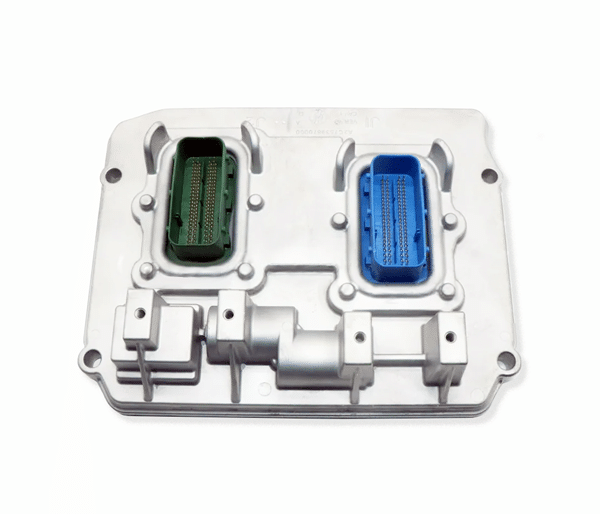
PART NUMBERS
2019-2021
ECM Part Numbers
Mopar Part Number:
68363277AA
Cummins Part Number:
4384696

RaceME Canada
Authorized Worldwide Headquarters
CUMMINS EQUIPPED 6.7 DODGE RAM TRUCKS
Tuners are to be used for Off-Road Competitions & Organised Racing.
RaceME Tuners
PRODUCT PRICING
All prices listed are in US funds. Orders processed will be charged to your credit card in USD.
This product is for competition use ONLY.
Not intended for use on any street driven or offroad vehicle.
FREE SHIPPING
All RaceME Tuners are shipped FREE!